参数解析库 argtable2 的使用

C 程序解析命令行参数一般都会使用 getopt/getoptlong 这两个 GNU 接口,简单的参数设计还好,稍微复杂的就会维护起来很麻烦,比如手写 usage、命令参数的分散性(参数的异常处理)等等。

argtable2 是一个底层基于 getopt 的命令行参数处理库,开源协议为 LGPL, 使用它开发复杂命令行接口简单且易于维护。

argtable2 在设计上,是面向参数本身,与该参数有关的信息都会汇聚在一起,成为一个 arg 对象。也就是说,该参数的特性,以及其 usage 都是在一起的,这对于开发和维护会特别方便(相对于基础的 getopt 而言)。

先来一个实际代码示例:

 1
 2
 3
 4
 5
 6
 7
 8
 9
10
11
12
13
14
15
16
17
18
19
20
21
22
23
24
25
26
27
28
29
30
31
32
33
34
35
36
37
38
39
40
41
42
43
44
45
46
47
48
49
50
51
52
53
54
55
56
57
58
#include <stdio.h>
#include <argtable2.h>

int main(int argc, char *argv[])
{
    int ret = 0;
    // 命令行参数处理
    struct arg_lit *arghelp         = arg_lit0("h", "help", "Show help and exit");
    struct arg_lit *argversion      = arg_lit0("v",  "version", "Show version");
    struct arg_str *argdev          = arg_str0("d",  "device", "<device>", "Input device, eg '/dev/ttyUSB0'");
    struct arg_int *argbaud         = arg_int0("b",  "baudrate", "<baudrate>", "Input device baudrate, eg '115200'");
    struct arg_file *argrecord      = arg_file0("r", "record", "<file>", "Enable record to file");
    struct arg_end *end             = arg_end(20);

    void *argtable[] = {arghelp, argversion, argdev, argbaud, argrecord, end};
    if (arg_nullcheck(argtable)) {
        fprintf(stderr, "OOM\n");
        ret = 1;
        goto CLEANUP;
    }
    // 预设值默认参数
    argdev->sval[0] = "ttyUSB0";
    argbaud->ival[0] = 115200;

    int nerr = arg_parse(argc, argv, argtable);

    if (arghelp->count > 0) {
        printf("Usage: %s", argv[0]);
        arg_print_syntaxv(stdout, argtable, "\n");
        printf("\nExample:\n");
        arg_print_glossary(stdout, argtable, " %-30s %s\n");

        ret = 0;
        goto CLEANUP;;
    }

    if (argversion->count > 0) {
        printf("Version: %s\n", "v1.0");
        ret = 0;
        goto CLEANUP;
    }

    if (nerr > 0) {
        arg_print_errors(stderr, end, argv[0]);
        printf("use '%s --help' for more info.\n", argv[0]);

        ret = 1;
        goto CLEANUP;
    }
    // 打印配置
    printf("device='%s' baudrate=%d\n", argdev->sval[0], argbaud->ival[0]);


CLEANUP:
    arg_freetable(argtable, sizeof(argtable) / sizeof(argtable[0]));

    return ret;
}

其中的核心设计就是 struct arg_xxx 系列的对象,用于存储参数的类型(literal/int/double/str/date 等)、短标识(比如 -v)、长标识(比如 --version)、参数表征类型(比如 <device>)、参数说明。因为 argtable 支持多次参数设置,所以还包含一个参数数量。

arg_lit0/arg_str0 这样的函数,用来初始化参数对象,其中 lit 代表无类型参数,比如 -v 这些,后面的数字代表参数的出现次数,0 类似正则中的 ?,即 0 或者 1次,而 1 代表必须 1 次,而 n 则代表可出现1次或多次。arg_end 是一个特殊对象,用来存储参数解析的异常情况,arg_end(X) 的参数代表可以存储最多多少个错误信息。

在解析时,则需要将各个参数对象放置到一个 argtable 中,然后利用 arg_nullcheck 和 arg_parse 去初始化和解析参数。

对于 usage 打印,可以使用 arg_print_syntaxv 这样的接口,这个接口会打印精简的命令行帮助,而 arg_print_glossary 则可以打印表格样式的命令行帮助:

 1
 2
 3
 4
 5
 6
 7
 8
 9
10
11
# gcc -o test 1.c -largtable2
# ./test -h
./test -h
Usage: ./test [-h|--help] [-v|--version] [-d|--device=<device>] [-b|--baudrate=<baudrate>] [-r|--record=<file>]

Example:
 -h, --help                     Show help and exit
 -v, --version                  Show version
 -d, --device=<device>          Input device, eg '/dev/ttyUSB0'
 -b, --baudrate=<baudrate>      Input device baudrate, eg '115200'
 -r, --record=<file>            Enable record to file

而对于参数的处理上,使用对应参数对象的 count 属性,来判断参数出现的次数,进而取值进行处理。需要注意的是,参数对象的值只在 arg_freetable 前生存有效,使用时需要注意生命周期管理。

不过对于程序而言,有时为了方便,可以不考虑调用 arg_freetable,毕竟程序结束时系统会进行回收,而参数处理,只有在程序运行时才执行1次而已,在程序运行期间保有这部分资源也还好。

如果参数对象需要设置默认参数值,则需要在 arg_nullcheck 后 arg_parse 前对字段进行赋值。

argtable2 本身底层仍然是调用 getopt 接口实现的,不过这种基于参数对象的管理设计,对于维护性有很大的提升,有时候,手写复杂的 getopt 太琐碎了。而且,argtable2 还支持 date 这样类型的参数处理,以及 kb/mb/gb 这样的尾缀表达,开发起来友好不少。

rv1106 适配 Wiznet-W5500 SPI以太网模块

本文主要记录如何在 LuckFox Pico Max RV1106 开发板上驱动 Wiznet-W5500 SPI以太网模块。

前文 给开发板适配 Alpine Linux 介绍了一个 RV1106 的开发板,尺寸小巧,功能十足,只有一个 100M 以太网口对于有些应用不大够用,USB 也是跟 Type-C 共享不容易引出扩展,GPIO 针脚上引出有 SPI 总线,可以利用 Wiznet-W5500 模组扩展一个低速网口使用。

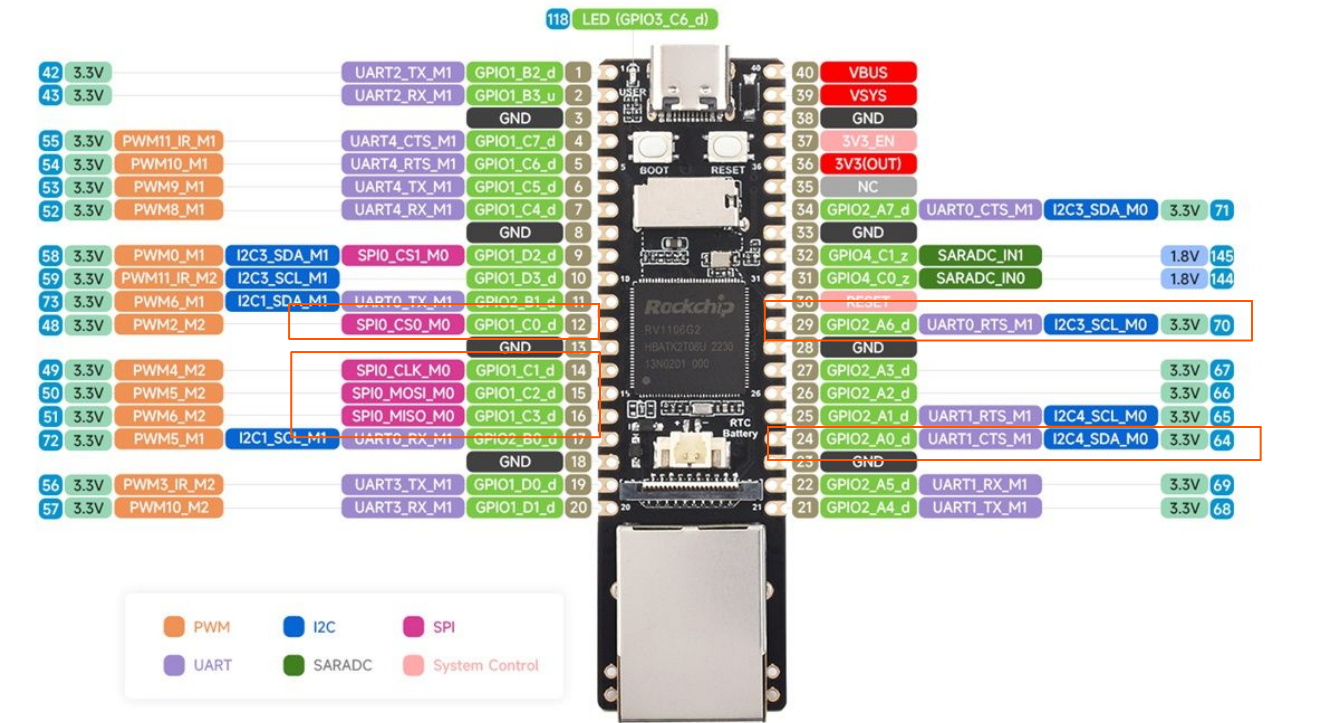
板载 GPIO 扩展引脚如下图所示:

Luckfox pico max gpio pins

W5500 模块除了连接 SOC SPI 总线外,还需要额外两个 GPIO 引脚用于连接 INT (中断处理) 和 RST (重置),如上图所示,SPI 片选使用 RV1106 的 CS0 ,中断(INT)使用 GPIO2_A6(29 引脚),重置(RST) 使用 GPIO2_A0 (24 引脚),需要注意硬件上电平转换。

硬件连接完成后,还需要配置 RV1106 BSP 以驱动该模块。Wiznet-W5500 在内核中使用 wiznet/w5100-spi 驱动模块,我们只需要配置内核 CONFIG 以及 DTS 即可。

Kernel Config 修改如下,激活 Wiznet/w5100-spi:

1
2
3
4
5
6
#FILE: source/kernel/arch/arm/configs/luckfox_rv1106_linux_defconfig

-# CONFIG_NET_VENDOR_WIZNET is not set
+CONFIG_NET_VENDOR_WIZNET=y
+CONFIG_WIZNET_W5100=m
+CONFIG_WIZNET_W5100_SPI=m

DTS 修改如下,配置 SPI,以及 w5500 INT 和 RST 引脚:

 1
 2
 3
 4
 5
 6
 7
 8
 9
10
11
12
13
14
15
16
17
18
19
20
21
22
23
24
25
26
27
28
29
30
#FILE: source/kernel/arch/arm/boot/dts/rv1106g-luckfox-pico-pro-max.dts

 // /**********SPI**********/
 &spi0 {
 	status = "okay";
 	pinctrl-names = "default";
 	pinctrl-0 = <&spi0m0_pins>;
-	cs-gpios = <&gpio1 RK_PC0 1>;
-	// cs-gpios = <&gpio1 26 1>;
+	//cs-gpios = <&gpio1 RK_PC0 1>;
+	cs-gpios = <&gpio1 16 1>;
 	#address-cells = <1>;
 	#size-cells = <0>;
 	spidev@0 {
+		status = "disabled";
 		compatible = "rockchip,spidev";
 		spi-max-frequency = <50000000>;
 		reg = <0>;
 	};
+	w5500@0 {
+		status = "okay";
+		compatible = "wiznet,w5500";
+		spi-max-frequency = <50000000>;
+		reg = <0>;
+		pinctrl-names = "default";
+		pinctrl-0 = <&uart1m1_ctsn>;
+		interrupt-parent = <&gpio2>;
+		interrupts = <6 IRQ_TYPE_EDGE_FALLING>;
+	};
 };

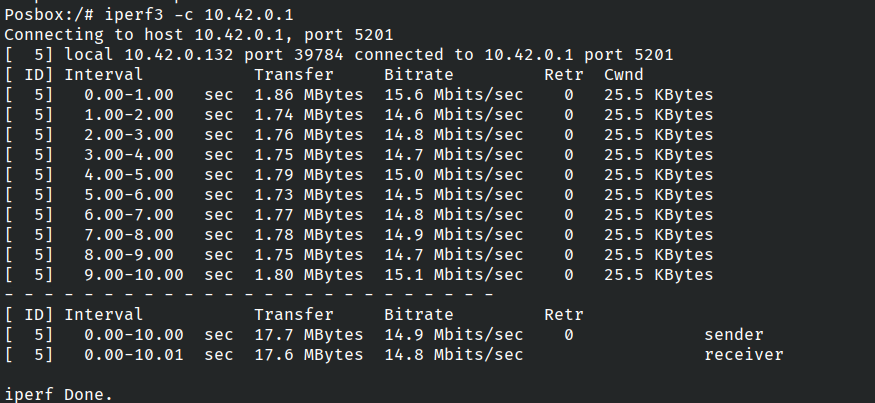
以上修改完成后,编译 BSP 生成镜像刷机即可,启动后会额外生成 eth1 设备,可以安装 iperf3 工具用来测试网口性能:

iper3f with w5500 on rv1106

基本可以达到 W5500 的 15 Mbps 的速率上限,此时 CPU 占用约在 50% 左右(多数在内核 sys 数据处理上,si 并不高),主要原因还是 rv1106 只有单核,性能有限。

这样扩展的网口,速率只有 10 Mbps 水平,对于一些收发数据率不高的应用场景,也足够了。

适合安卓的 sing-box 客户端配置

本配置适合安卓客户端,版本需要 1.10.0-beta 以上版本。

安卓版本使用 tun 来实现代理,与 Linux 桌面版本略有不同。

配置策略

本配置主要策略:

  1. DNS 提供国内和国外分流,且避免 DNS 泄漏;
  2. 流量基于 GeoIP/GeoSite 实现国内外分流;
  3. 过滤广告;
  4. 忽略部分国内主流应用(微信/淘宝/京东等,避免流量经过代理);
  5. 忽略本地/似有地址的流量;

配置文件内容

本配置主要内容如下,适合 sing-box 1.10 beta 以上版本:

  1
  2
  3
  4
  5
  6
  7
  8
  9
 10
 11
 12
 13
 14
 15
 16
 17
 18
 19
 20
 21
 22
 23
 24
 25
 26
 27
 28
 29
 30
 31
 32
 33
 34
 35
 36
 37
 38
 39
 40
 41
 42
 43
 44
 45
 46
 47
 48
 49
 50
 51
 52
 53
 54
 55
 56
 57
 58
 59
 60
 61
 62
 63
 64
 65
 66
 67
 68
 69
 70
 71
 72
 73
 74
 75
 76
 77
 78
 79
 80
 81
 82
 83
 84
 85
 86
 87
 88
 89
 90
 91
 92
 93
 94
 95
 96
 97
 98
 99
100
101
102
103
104
105
106
107
108
109
110
111
112
113
114
115
116
117
118
119
120
121
122
123
124
125
126
127
128
129
130
131
132
133
134
135
136
137
138
139
140
141
142
143
144
145
146
147
148
149
150
151
152
153
154
155
156
157
158
159
160
161
162
163
164
165
166
167
168
169
170
171
{
  "log": {
    "level": "info"
  },
  "dns": {
    "servers": [
      {
        "tag": "dns-remote",
        "address": "https://1.1.1.1/dns-query",
        "detour": "proxy",
        "client_subnet": "1.0.1.0"
      },
      {
        "tag": "dns-default",
        "address": "local",
        "detour": "direct"
      },
      {
        "tag": "dns-block",
        "address": "rcode://refused"
      }
    ],
    "rules": [
      {
        "rule_set": "anti-ad",
        "server": "dns-block"
      },
      {
        "rule_set": [
          "geosite-cn"
        ],
        "server": "dns-default"
      },
      {
        "outbound": "any",
        "server": "dns-default"
      }
    ],
    "final": "dns-remote",
    "disable_expire": true
  },
  "inbounds": [
    {
      "type": "tun",
      "tag": "tun-auto",
      "mtu": 9000,
      "address": [
        "172.18.0.1/30",
        "fdfe:dcba:9876::1/126"
      ],
      "auto_route": true,
      "strict_route": true,
      "route_address": [
        "0.0.0.0/1",
        "128.0.0.0/1",
        "::/1",
        "8000::/1"
      ],
      "route_exclude_address": [
        "10.0.0.0/8",
        "172.16.0.0/12",
        "192.168.0.0/16",
        "fc00::/7"
      ],
      "exclude_package": [
        "com.jingdong.app.mall",
        "com.douban.frodo",
        "com.taobao.taobao",
        "com.eg.android.AlipayGphone",
        "com.tencent.mm",
        "com.tencent.mp",
        "com.tencent.soter.soterserver",
        "com.tencent.wemeet.app",
        "com.tencent.weread",
        "com.tencent.wework"
      ],
      "udp_timeout": "5m",
      "stack": "mixed",
      "platform": {
        "http_proxy": {
          "server": "127.0.0.1",
          "server_port": 8080
        }
      },
      "sniff": true
    }
  ],
  "outbounds": [
    {
      "type": "selector",
      "tag": "proxy",
      "outbounds": [
        "trojan",
        "hysteria"
      ],
      "default": "trojan"
    },
    {
      "type": "trojan",
      "tag": "trojan",
      ...
    },
    {
      "type": "hysteria",
      "tag": "hysteria",
      ...
    },
    {
      "type": "direct",
      "tag": "direct"
    },
    {
      "type": "block",
      "tag": "block"
    },
    {
      "type": "dns",
      "tag": "dns-out"
    }
  ],
  "route": {
    "rules": [
      {
        "rule_set": "anti-ad",
        "outbound": "block"
      },
      {
        "protocol": "dns",
        "outbound": "dns-out"
      },
      {
        "ip_is_private": true,
        "rule_set": [
          "geoip-cn",
          "geosite-cn"
        ],
        "outbound": "direct"
      }
    ],
    "rule_set": [
      {
        "type": "remote",
        "tag": "anti-ad",
        "format": "binary",
        "url": "https://github.com/SagerNet/sing-geosite/raw/rule-set/geosite-category-ads-all.srs",
        "download_detour": "proxy"
      },
      {
        "type": "remote",
        "tag": "geosite-cn",
        "format": "binary",
        "url": "https://github.com/SagerNet/sing-geosite/raw/rule-set/geosite-cn.srs",
        "download_detour": "proxy"
      },
      {
        "type": "remote",
        "tag": "geoip-cn",
        "format": "binary",
        "url": "https://github.com/SagerNet/sing-geoip/raw/rule-set/geoip-cn.srs",
        "download_detour": "proxy"
      }
    ],
    "final": "proxy",
    "auto_detect_interface": true
  },
  "experimental": {
    "cache_file": {
      "enabled": true
    }
  }
}

备注

需要注意的地方:

  1. 由于 sing-box 内部 DNS 服务性能原因,建议境内 DNS 使用 local,尽量不用 DOH/DOT,否则会因为解析延迟影响体验;
  2. tun.exclude_package 里是需要忽略的应用包名,常见应用可以去搜索包名添加,以避免走代理;
  3. route.rules.auto_detect_interface 是需要设置的,否则代理会无法生效;